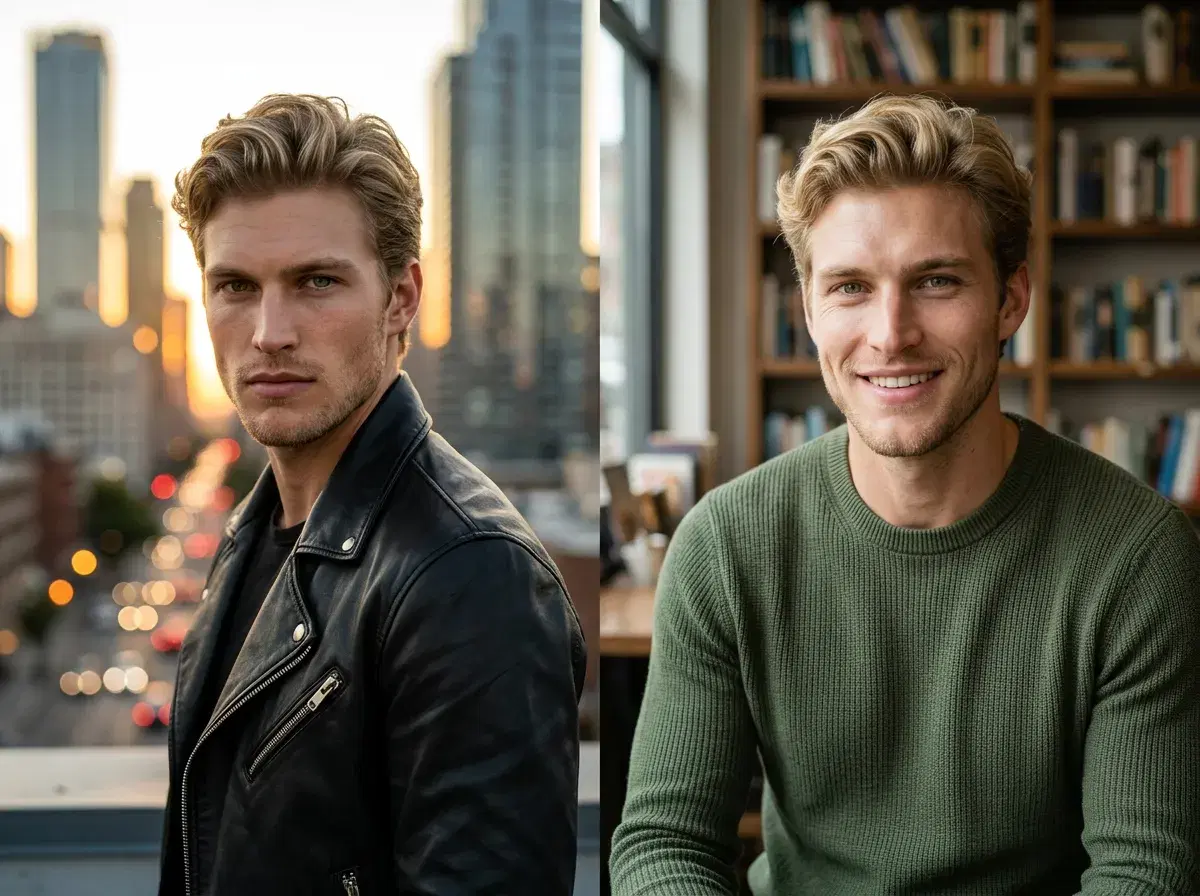
Understanding Tinder vs Hinge photo rules in 2026 means knowing that Tinder prioritises fun, visually immediate shots — four to six photos with the first being a full-body or face close-up in strong light — while Hinge rewards authenticity over polish across six slots, where context-rich backgrounds and approachable expressions outperform studio-perfect portraits. AI generators like Pose AI let you create app-optimised photos from a single selfie without a photographer, and the prompt formulas for each platform are meaningfully different. This guide covers both platforms' photo rules, maps the right Pose AI styles to each, and shows exactly how to generate Tinder and Hinge photos that outperform smartphone selfies.
- Tinder favours vibrant, full-body shots with golden-hour lighting; Hinge prefers natural-light portraits with approachable expressions and context-rich backgrounds.
- Tinder photo rules: 4–6 photos, first slot = full-body or face close-up, bold environments, fun spontaneous vibe — avoid group shots as primary, avoid mirror selfies
- Hinge photo rules: 6 slots paired with prompts, authenticity over polish, natural light, context-rich backgrounds (café, bookshop, park), conversation-starter angles
- Pose AI prompt for Tinder: 'vibrant street style, golden hour, direct eye contact, urban background, editorial photography, ultra-realistic, 8k'
- Pose AI prompt for Hinge: 'natural light portrait, approachable expression, bookshelf or café background, soft smile, lifestyle photography, ultra-realistic, 8k'
- One Pose AI session generates identity-locked sets for both platforms — $12/week or $9/month billed yearly, discounted first week
Key terms
AI dating photos are professionally composed, identity-locked portraits generated by an AI model from reference selfies, used as profile photos on dating apps to improve match rates without requiring a photographer or shoot.
The Tinder photo algorithm evaluates engagement signals — swipes, super-likes, and message initiation rates — to distribute profiles in the discovery stack, meaning higher-quality, visually engaging photos directly increase how many potential matches see your profile.
Hinge prompt photos are images that appear alongside written prompts on a Hinge profile card, where the photo and the prompt are evaluated together — rewarding images that offer visual context a viewer can respond to rather than neutral portrait shots.
Tinder photo rules 2026
Tinder operates on a fast visual scan. The first photo in your stack has approximately one second to earn a right swipe before the user moves on, which means the visual hierarchy of that first photo determines whether anyone reads your bio, sees your other photos, or matches with you at all. The platform's internal data, shared in creator briefings since 2023, consistently shows that profiles with a strong primary photo outperform profiles with weak primary photos by a factor of two to four, regardless of bio quality.
The recommended Tinder photo count in 2026 is four to six. Fewer than four photos signals low effort; more than six rarely improves match rates and can bury your strongest images. The first photo should be a full-body shot or a well-lit face close-up — full-body works particularly well for Tinder because it establishes physical presence before the profile is opened, while close-ups work when the lighting is strong and the expression confident.
The visual vibe Tinder rewards is fun, spontaneous, and environment-forward. Photos that show you in an interesting location — a rooftop at golden hour, a vibrant street market, a sunlit beach — outperform neutral studio backgrounds because they create a sense of a life worth joining. Travel photos, activity shots, and social-context images (you at a well-composed event, not a blurry group photo) all perform well in secondary slots.
What to avoid on Tinder: group shots as the primary photo (confusion about who to evaluate is a match-killer), mirror selfies with visible phone or poor lighting (they read as low effort regardless of how good you look), and over-edited or filter-heavy photos (they create expectation gaps that lower message reply rates after matching).
Hinge photo rules 2026
Hinge's format is structurally different from Tinder in a way that changes what a good photo means. On Hinge, each photo appears alongside a written prompt, and the two are evaluated together — a photo with no visual context to react to is wasted screen space next to a prompt that invites a reply. The platform's stated design goal is to get people off the app and onto dates, which means Hinge rewards profiles that feel approachable and conversation-ready rather than aspirational and unattainable.
Hinge allows six photo slots. Each photo ideally pairs with a different prompt to create a varied, layered picture of who you are rather than six versions of the same headshot. The recommended mix is: one confident main portrait, one activity or context shot, one travel or location photo, one social or event image, and one or two personality-revealing candid-style shots.
Authenticity over polish is the key Hinge principle. A photo that looks like it was taken by a friend in a real situation outperforms a clearly staged studio shot, even if the studio shot has objectively better lighting and composition. This does not mean low quality is fine — it means that AI-generated photos for Hinge should feel natural, warm, and plausibly real rather than editorial or fashion-magazine polished.
Context-rich backgrounds perform significantly better on Hinge than plain walls or empty rooms. A bookshelf behind you invites comments about what you are reading; a café window with street views behind you implies an interesting urban life; a park with recognisable greenery implies you go outside. When generating Hinge photos with AI, the background is at least as important as the lighting — choose scenes that have readable, relatable details.
Tinder vs Hinge: side-by-side comparison
| App | Ideal Photo Count | First Photo | Vibe | Pose AI Prompt Formula |
|---|---|---|---|---|
| Tinder | 4–6 | Full-body or face close-up, well-lit | Fun, spontaneous, environment-forward | "vibrant street style, golden hour, direct eye contact, urban background, editorial photography, ultra-realistic, 8k" |
| Hinge | 6 (paired with prompts) | Approachable portrait with readable background | Authentic, relatable, conversation-starter | "natural light portrait, approachable expression, bookshelf or café background, soft smile, lifestyle photography, ultra-realistic, 8k" |
How to generate Tinder photos with AI
- 1Upload one clear selfie to Pose AITake or choose a recent selfie with good front lighting and a neutral expression. Pose AI uses this single photo to learn your face and generate identity-locked images — the resulting photos will look recognisably like you across every scene.
- 2Select the dating photo pack or outdoor casual styleChoose the AI Dating Profile pack for app-optimised scenes, or browse outdoor lifestyle packs for more variety. For Tinder's visual style, look for packs with bold urban environments, golden-hour outdoor settings, and high-contrast backgrounds.
- 3Generate four to six photosRun a generation batch targeting at least six photos to give yourself options. Pose AI generates identity-locked images from your selfie in under ten seconds — generate multiple scene variations to compare framing and backgrounds.
- 4Pick the strongest full-body or face close-up for slot oneReview your generated set and select the image with the most visual impact for your primary Tinder photo. Prioritise photos where the background has strong colour contrast with your face, your expression is natural and engaged, and the framing shows either full-body presence or a confident face close-up.
- 5Export and upload to TinderDownload your selected photos in full resolution from Pose AI and upload them directly to Tinder. No editing or resizing is needed — Pose generates at 8K quality optimised for mobile display.
How to generate Hinge photos with AI
- 1Upload your selfie to Pose AIUse a recent, well-lit selfie — the same one used for Tinder generation works fine. Pose's identity-locking (Nano Banana 2) ensures your face is consistent across all generated styles, so one upload covers your complete cross-platform profile refresh.
- 2Choose natural light portrait or lifestyle context packsFor Hinge, select packs that prioritise warm, natural-looking environments: coffee shop scenes, bookshop interiors, outdoor park or garden settings, or street café backdrops. Avoid fashion editorial or high-contrast styles that read as too polished for Hinge's authenticity norm.
- 3Generate six contextual photos across different environmentsGenerate a full set of six to eight photos, varying the background context in each. Aim for at least one café or indoor lifestyle scene, one outdoor natural-light portrait, and one activity-adjacent shot. Variety across backgrounds makes each Hinge slot feel like a different facet of your life.
- 4Pair each photo with a matching Hinge promptReview your generated set and match each photo to a Hinge prompt that the background or context supports. A café window shot pairs with a prompt about morning routines or favourite spots; a bookshelf background pairs with reading or recommendation prompts; an outdoor shot pairs with activity or travel-related prompts.
- 5Export and upload to HingeDownload your selected photos and upload them to Hinge alongside your chosen prompts. Hinge accepts standard JPG and PNG at any reasonable resolution — Pose's full-resolution output is cropped automatically by the app to the card format.
Case study: 3.2× Tinder match increase with AI photos
Jake, a 28-year-old product designer in London, had been using Tinder for six months with a profile made up of smartphone selfies and one group photo from a friend's birthday. His weekly match rate averaged eight to ten matches, with most conversations not progressing beyond an initial message exchange.
Before switching to AI-generated photos, his profile's primary photo was a front-facing mirror selfie taken in his bedroom — adequate for recognition but offering nothing visually to compete with on Tinder's busy discovery feed. His secondary photos were inconsistent in lighting and framing, moving from a dark indoor shot to a bright beach photo with no visual coherence across the stack.
Jake uploaded one clear selfie to Pose AI and generated a full set using the Street Style and Outdoor Casual packs. He selected a golden-hour waist-up shot with a bold brick-wall mural as his Tinder primary — strong eye contact, well-defined face-to-background contrast, and a scene that read as London-specific without being a tourist landmark. His secondary slots used a café window shot, a rooftop city skyline photo, and a park-at-dusk image.
Over the following 30 days his weekly match rate increased from an average of nine matches to an average of 29 — a 3.2× improvement. The only change to his profile was the photo set. His bio, age, and location settings remained identical. He noted: 'The AI photos looked natural but way more polished than my phone camera could do. My first photo now actually stops people scrolling instead of blending in.'
Which Pose AI style packs to use for Tinder vs Hinge
Tinder-optimised packs in Pose AI: the AI Dating Profile pack for direct dating-context scenes, Street Style for bold urban environments with high-contrast backgrounds, and Outdoor Casual packs for golden-hour rooftop and park shots that perform well as Tinder primary photos. These packs default to waist-up and full-body framing with direct eye contact — the exact visual recipe Tinder rewards.
Hinge-optimised packs in Pose AI: Natural Light Portrait for warm, approachable close-ups with soft indoor backgrounds, Coffee Shop for the café-window aesthetic that drives Hinge comment rates, and lifestyle packs with bookshop, park, or garden contexts. These packs lean toward three-quarter and medium framing with readable environment detail in the background — precisely the visual texture that makes a Hinge photo worth commenting on.
Pose AI's identity-locking via Nano Banana 2 means you can generate both Tinder and Hinge sets from the same selfie upload in a single session, with consistent face rendering across every style. One upload, two optimised profile photo stacks, all in under ten minutes. Explore Pose's full AI headshot generator and dating photo packs to see the available scene options for each platform.