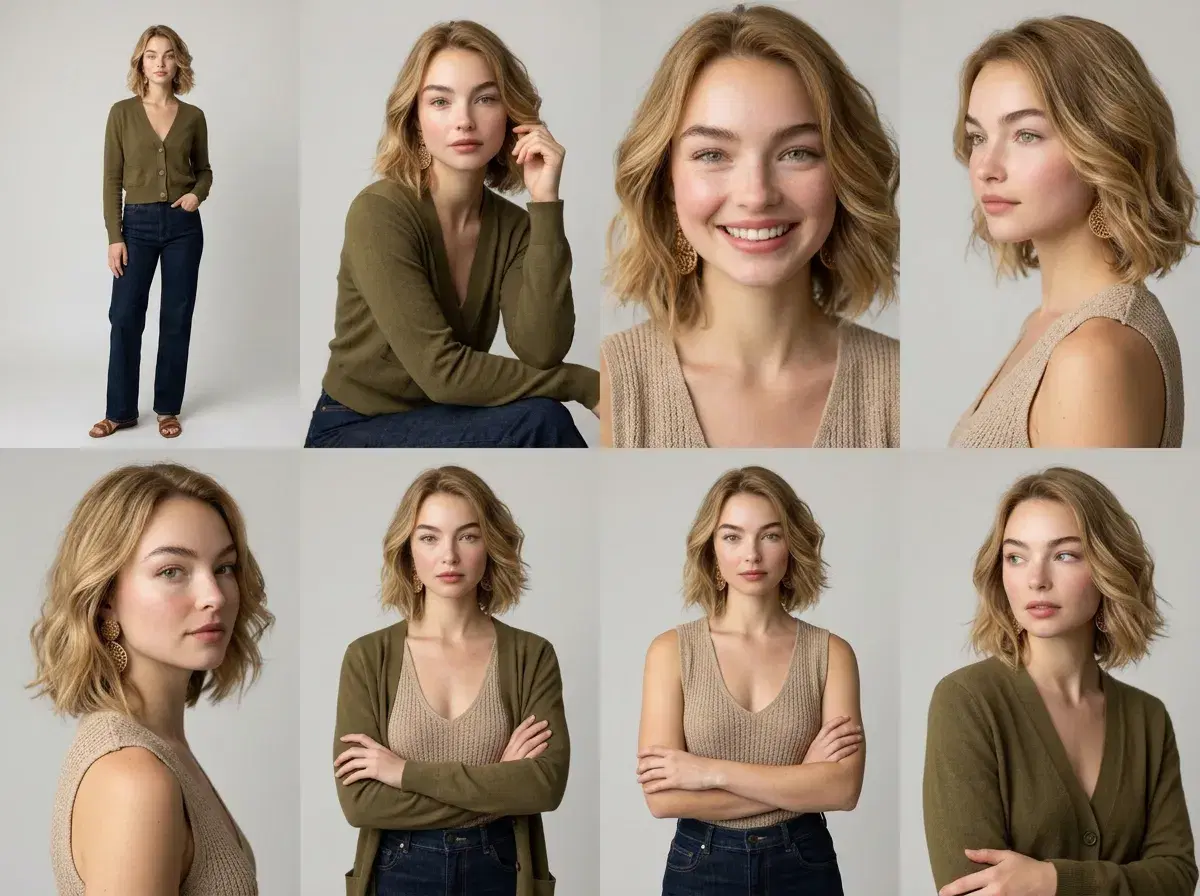
AI poses are AI-generated portrait photographs that render you in a chosen pose, framing, and setting — seated, standing, three-quarter turn, arms crossed, a full-length editorial shot — without a camera, a photographer, or a physical shoot. Instead of directing your body in front of a lens, you pick a style or describe a scene, and an image model renders you in that pose from a single selfie.
This guide explains what AI poses actually are, how the generation works under the hood, where the pose in a generated photo comes from, and how the same idea extends from a still image into video motion. It's written to be the plain-English reference for the concept, not a sales page.
For the professional-portrait use case, see AI headshots.
- Choose a pose from Pose AI's library or upload a reference photo; match pose angle to your art style; generate with Image Studio.
- AI poses are AI-generated portrait photography: images that show you in a specific pose, framing, and setting, generated from a selfie rather than photographed.
- The pose comes from the style you choose or the scene you describe — the model reads your face from one selfie and renders it into that pose, held consistent by identity lock.
- Pose AI generates them natively through image models (Nano Banana 2, Flux Kontext, GPT-image 2) and carries the same identity into motion through six native video engines (Kling, SeedDance, Wan, Veo, Sora 2, HeyGen).
- It's one selfie with no training step, across 200+ styles that each imply their own poses and settings.
- $4.99 the first week, then $14.99/week with 400 credits that cover both image and video generation, with no watermarks.
What are AI poses?
An AI pose is a pose rendered by a generative image model rather than captured by a camera. In a normal photo shoot, a photographer positions you — turn your shoulder, drop your chin, cross your arms — and the camera records what's actually in front of it. In AI portrait photography, there's no physical positioning: the pose is described (by the style you pick or the words you write) and the model generates an image of you holding it. The output is a photograph-style image of a pose that never physically happened.
That's the whole idea behind the term. "AI poses" is shorthand for AI-generated portrait photography where the pose, the framing, and the environment are all specified as instructions and rendered onto your likeness. The useful ones look like real photographs — natural body language, believable light, a setting that reads as a place — rather than obviously synthetic illustrations.
How AI pose generators work
The core of it is identity-locked image generation. You upload a single selfie, and the model reads your facial features from it. When you then pick a style — a corporate headshot, a golden-hour travel portrait, a studio fashion shot — or describe a scene in words, the model generates a new image that combines your identity with the pose, wardrobe, lighting, and background that style or description implies. Because the identity is locked to your selfie, the person in every generated pose is recognisably you rather than a plausible stranger.
Pose AI does this natively with a set of image models: Nano Banana 2 for identity-locked realism, with Flux Kontext and GPT-image 2 available for different looks. There's no lengthy model-training step and no batch upload — one selfie is enough to start, and each generation takes seconds. That's the practical difference from tools that train a bespoke model on a folder of your photos before they can generate anything.
It's worth being precise about where the pose itself comes from, because it's easy to imagine a discrete "pose picker" that doesn't quite exist. The pose is a property of the style or the scene, not a separate dial. Choosing a style that's framed as a seated executive portrait gives you a seated pose; describing "standing against a city skyline at dusk, arms relaxed" gives you that. Across 200+ styles, you get a wide range of poses and framings without having to engineer each one, and you can steer further by describing the scene you want.
Poses, framing, and setting: what you can actually control
In practice, three things move together in a generated pose: the body position (seated, standing, leaning, three-quarter turn, arms crossed, hands in pockets), the framing or crop (close-up headshot, chest-up, waist-up, three-quarter, full-length), and the setting (studio, office, outdoors, a specific city or backdrop). Picking a style sets all three at once in a coherent way; writing your own scene description lets you combine them deliberately.
The honest limit is that this is generation, not a photo-editing tool with a pose slider — you're guiding the model with styles and words, and it renders its best interpretation. Regenerating is cheap, so the normal workflow is to generate several variations of a pose and keep the ones that land, rather than expecting a single exact result on the first try. Identity lock is what makes that workflow useful: every variation still looks like you, so you're choosing between poses of yourself rather than between different faces.
Static AI poses vs. AI video poses
A still AI pose is a single frozen moment. AI video poses extend the same identity into motion — the same face, now moving through a pose or a short sequence rather than holding one. Where a photo captures you mid-turn, a video shows the turn happening.
Pose AI generates that motion natively through six video engines: Kling for camera movement, SeedDance for body motion and motion transfer, Wan for fast iteration, Veo and Sora 2 for photorealistic scenes, and HeyGen for talking-head delivery. The identity that anchors your still poses carries straight into the clip, so a headshot and a short intro video read as the same person. Nothing gets exported to an external video tool — the image and video sides run on the same platform and the same 400 weekly credits.
For the motion side, see the Pose AI Video Studio.
Where AI poses are useful
The strongest fit is anywhere you need several good images of yourself in different poses and settings without booking a shoot for each one. Professional profiles — a clean seated headshot for LinkedIn, a standing full-length for a bio page. Dating and social profiles, where a spread of natural poses in different places reads better than one repeated angle. Content and personal branding, where you want a consistent look across many posts. Creative and themed portraits, where the pose and setting are the whole point.
The one rule that makes all of it work is keeping the likeness honest: because the generation is identity-locked to a recent selfie, the poses look like you now, which is the entire point of the exercise. A pose that flatters you into a different person just relocates the surprise to whenever someone meets you.
See what a week of credits covers on Pose AI pricing.
Using Poses for AI Art Generation in 2026
Choose a pose from Pose AI's library or upload a reference photo; match the pose angle to your art style; generate with Image Studio.
Selecting a reference pose: browse Pose AI's style library for a pose and setting that fits your project, or describe the position you want directly in your prompt.
Uploading a custom pose: a clear photo showing your desired body position and angle can guide generation alongside your identity-locking selfie, for more precise control than a description alone.
Matching pose angle to art style: portraits favor a direct or three-quarter angle with the face clearly visible; action or fantasy art favors dynamic, weighted stances with more dramatic foreshortening.
Exporting for further use: generated images download at full resolution and can be brought into other tools for illustration, compositing, or further editing.