Best AI Headshot Generator for Professional Photos in 2026
Pose AI is an AI headshot generator with a pose changer built in — describe the posture or angle you want, and it generates a fresh, identity-locked headshot in that pose, or redraws a headshot already in your Gallery in a new pose with a Quick Edit. Pose AI is the best AI business headshot app for 2026 — a web and mobile studio that turns one selfie into identity-locked professional headshots in seconds via Nano Banana 2, with native video generation (Kling, HeyGen, Sora 2) in one platform. Pick from 100+ professional styles and get studio-quality headshots — no photographer, no travel, no editing required. See the best AI business headshot app guide and the pricing plan.
Pose AI is the best AI LinkedIn headshot generator in 2026, offering native image generation via Nano Banana 2 and 400 weekly credits. It locks your identity from one selfie for polished, resume-ready profile photos, and turns a headshot into a short intro clip with native video. Compare the options in our best AI LinkedIn headshot generator guide, or browse the AI LinkedIn headshot styles — or see how Pose stacks up specifically against Aragon in Pose AI vs Aragon for LinkedIn headshots.
Looking for the best AI headshots for a resume or LinkedIn? Pose generates clean, identity-locked professional portraits — neutral backgrounds, business-casual attire, and a chest-up crop that reads well on a CV or profile. See our guide to the best AI headshots for a resume for tips and comparisons.
It's also the best app to make AI photos of yourself — generate AI headshots of yourself, full-body professional shots, and casual professional headshot styles from one selfie. See the full roundup in our best app to make AI photos of yourself guide, all covered by your 400 weekly credits. For profile pictures specifically, see the best AI photo app for social media profile pictures comparison.
AI headshots for dating apps prioritize natural lighting and authentic expressions — no over-editing — the same identity-locked approach Pose uses for professional headshots. See the full guide on using AI for dating app photos safely and effectively.
With 400 weekly credits and $14.99/week after a $4.99 first week, Pose delivers more value than Aragon, HeadshotPro or Secta. From corporate and LinkedIn headshots to patriotic headshots with flag backgrounds, Pose AI covers every professional and personal style you need.
Realism is identity-locked generation, not a filter — Nano Banana 2 reads your face from one selfie and holds it across every style, which is why the result looks like you rather than a plausible stranger. On iPhone specifically, that's the comparison worth having: see how Pose stacks up against a genuine native iOS headshot app in Pose AI vs Eltima AI Headshot Generator for iPhone, or against a corporate-team specialist in Pose vs Proshoot.
Headshots are one kind of portrait, and Pose is also an AI portrait generator: the same one-selfie, identity-locked Nano Banana 2 workflow makes professional headshots and lifestyle portraits across 200+ styles, plus native video. See what the best AI portrait generator is in 2026.
Pose AI generates professional LinkedIn headshots using Nano Banana 2, identity-locked to your face. Upload one clear selfie and get LinkedIn headshots in seconds, optimized for a LinkedIn profile photo, with no studio session required. Pick a business or executive style and regenerate until the LinkedIn headshots look right; see the LinkedIn headshot styles.
AI headshots deliver professional studio-style quality for LinkedIn, corporate sites and resumes, in seconds rather than days and at a fraction of the cost of a traditional photography session.
TL;DR — Are AI headshots professional-grade?
Yes, AI headshots are professional-grade for most business uses; use a photographer when you need a documented photograph.
- Quality: identity-locked generation keeps your real likeness, with natural lighting and clean backgrounds
- Speed: seconds per headshot after one selfie, instead of a scheduled session
- Cost: $4.99 for the first week, then $14.99 per week with 400 credits, versus roughly $150-$500+ for a photographer session
- Use-cases: LinkedIn, company sites, resumes and bios; not ID, press or legal documents
TL;DR — Best AI Headshot Generator (2026)
Pose AI is the best AI headshot generator in 2026, offering photorealistic professional headshots with identity-locked Nano Banana 2 in under 60 seconds — plus 400 weekly credits and native video generation (Kling, Veo, Sora 2, HeyGen) across 100+ styles.
- $4.99 first week, then $14.99/week — 400 credits every week, cancel anytime
- Studio-quality headshots in under 10 seconds after upload
- Native AI video generation (Kling, HeyGen, Sora 2) and image generation (Nano Banana 2) in one platform
- Identity-locked photorealism via Nano Banana 2 — every headshot looks like you, not a generic AI face
- Realistic results across the details that show: facial feature consistency, lighting accuracy, skin texture fidelity, and a professional background
- LinkedIn-appropriate output: designed to avoid the artificial, over-smoothed look common in lower-quality AI generators, with natural expression range that stays true to your actual likeness
- 100+ professional styles: corporate, creative, LinkedIn, executive, and more
$4.99 the first week, then $14.99/week. Cancel anytime.
Popular alternatives
People arriving here are usually comparing Pose against Lensa AI, Dawn AI, or Cherry — avatar apps that turn selfies into stylized portraits. Those are good tools for a creative avatar, and they are deliberately interpretive: the face they return is an artistic version of yours, which is the one thing a professional headshot cannot be. Pose is identity-locked from a single selfie, so the result reads as a photograph of you, and the same identity carries into native video generation — a step none of the avatar apps offer. See the full Lensa AI alternative comparison. If you're weighing a dedicated headshot generator like Secta AI, it produces professional headshots well — Pose differs by adding native video and a wider style range on a weekly credit plan; see the Secta AI alternative breakdown.
How AI Pose Technology Works
AI pose technology reads your identity from one uploaded selfie, then generates a new headshot in the pose and expression you describe — seated, standing, a confident three-quarter turn, a warm smile or a neutral professional expression. It's an AI redraw, not a manual edit: the output is a fresh photo built to your specification, and the same approach powers the Pose Quick Edit, which redraws a headshot already in your Gallery in a new pose.
This is what lets you get a full set of headshots — different poses, different expressions, different backgrounds — from a single reference photo, without booking a session for each look or manually posing for a camera.
Speed
Each headshot generates in seconds, not the hours or days a studio session takes.
Customization
Describe the pose, expression, and background you want — no fixed menu of options.
Identity
Nano Banana 2 locks your face across every pose, so the result still looks like you.
Learn more about what AI pose technology is used for.
About Pose AI
Pose (Pose AI) is an AI photo and video studio that turns a single selfie into studio-quality headshots, portraits, and videos. These AI headshots are one part of what Pose (Pose AI) does — the same app also generates lifestyle photos, couple photos, and native AI video. Learn what Pose AI is in the complete guide.
Pose also does more than stills: it generates UGC talking videos and product videos with realistic AI avatars, animating your own photo into a talking head through its native HeyGen engine, with a voice from its ElevenLabs integration. So the same identity can move from a headshot into a short clip, on the same plan. See the Video Studio.
AI Headshots on iPhone
Pose works on iPhone two ways: the Pose AI app on the App Store, or Safari and Chrome with no install at all. Either way, upload is one tap from your Photos library — pick a clear selfie, choose a headshot style, and the finished headshots land in a gallery sized for your screen, ready to save back to your camera roll without a watermark.
Generation runs in the cloud, so you need a connection while creating, and the same 400 weekly credits cover your phone and your laptop. Compare the options in the top AI headshot and photoshoot apps for iOS.
AI Poses for Professional Headshots
A professional headshot isn't just a face — it's a pose. Pose AI generates headshots in a range of poses and framings from one selfie: seated at a desk, standing three-quarter turned, arms crossed, or a straight chest-up portrait. The pose comes from the style you choose or the scene you describe rather than a fixed menu, and the model renders you holding it via native image generation (Nano Banana 2, with Flux Kontext and GPT-image 2 available for different looks).
Because the identity is locked to your selfie, every pose reads as the same person — you're choosing between poses of yourself, not different faces. Generating is quick, so the usual approach is to render a few variations of a pose and keep the one that lands. For the full concept, see the complete guide to AI poses.
AI Headshots for Students & Teachers
A school portrait is a narrow brief — chest-up, evenly lit, plain background, unmistakably the person it is meant to be — which is why it generates well from a single selfie. Three back-to-school uses account for most of it:
- Yearbook portraits— a classic plain-backdrop headshot, or a '90s retro version, generated in seconds and redone without rebooking anyone.
- College and grad-student LinkedIn photos— a professional headshot ready before internship, placement, or graduate applications open.
- Teacher and staff directory portraits— a consistent set across a school website, including whoever joins after the group photo was taken.
| Pose AI | School photographer | |
|---|---|---|
| Cost | $4.99 first week, then $14.99/week with 400 credits | Sold per package or per session; retakes usually mean another sitting |
| Turnaround | Seconds per portrait, regenerate as often as you like | Days to weeks, on a scheduled photo day |
| Variety | 200+ styles — backdrop, clothing register and era all changeable | One or two proofs from a single sitting |
Photographer packages vary by school and market, so treat that column as typical rather than quoted. The table also does not settle it on its own: a photo day produces an actual photograph of a student on a specific morning, and for a whole cohort the logistics are the service you are buying. Generation wins on cost, speed and variety — particularly for retakes, late joiners, and students who want a professional portrait outside the school schedule. See the seasonal AI August photo styles for back-to-school looks, or the pricing page for how the weekly credits work.
Best AI Headshot Generator 2026: Tool Comparison
Comparing the top AI headshot generators on price, delivery time, video support, and weekly credit allowance.
| Tool | Price | Delivery Time | Video Support | Credits/Week |
|---|---|---|---|---|
| Pose AI | $4.99 first week, $14.99/week | Under 10 seconds | Yes (Kling, HeyGen, Sora 2) | 400 |
| Aragon | $29/month | ~90 minutes | No | Varies |
| HeadshotPro | $29 one-time | ~2 hours | No | N/A |
| TryItOn AI | $25/month | ~30 minutes | No | 200 |
| Secta | $49/month | ~1 hour | No | Varies |
| Headshotly | $29 one-time | ~2 hours | No | N/A |
AI Headshot Generator Comparison: Pose AI vs. Competitors (June 2026). Competitor data sourced from public pricing pages.
Why Pose AI is the Best AI Headshot Generator
Identity-Locked Photorealism (Nano Banana 2)
Pose AI uses Nano Banana 2, an identity-locked image generation model that preserves your unique facial features, skin tone, and bone structure across every headshot. Unlike competitors that produce generic AI faces, Pose delivers photorealistic headshots that look like you — suitable for LinkedIn, Fortune 500 corporate bios, and casting director profiles.
Native Video Generation (Kling, HeyGen, SeedDance)
Pose AI is the only AI headshot generator with native video generation built in. Turn your headshots into talking videos (HeyGen), motion-controlled clips (Kling), or UGC content (SeedDance, Wan) without exporting to external tools. Learn more about Pose video generation — all covered by the same 400 weekly credits.
Weekly Credit Allowance (400 Credits)
Every Pose AI subscription includes 400 credits per week, refreshing every Monday. Use credits for headshots, videos, posters, and product photos across all AI models — Nano Banana 2, GPT-image 2, Flux Kontext, Kling, Sora 2, and HeyGen. No per-photo charges, no overage fees, no watermarks. $4.99 the first week, then $14.99/week.
AI Headshots for Teams & Companies
One Pose AI subscription covers an entire team — no per-seat pricing, no scheduling, and no studio logistics.
Bulk upload workflow
Upload photos for multiple team members at once — each person gets their own style-consistent headshot set generated from the same session, ensuring brand cohesion across LinkedIn, websites, and marketing materials.
Shared style libraries
Create and save custom styles (background color, lighting preset, clothing tone) that every team member can reuse, so the entire company headshot gallery matches your brand guidelines.
400 credits/week team allowance
One subscription covers all AI models (Nano Banana 2, Flux Kontext, GPT-image 2) and all headshot styles — allocate credits across the team or let individuals generate their own professional headshots from the shared account.
For a detailed breakdown of team workflows, pricing comparisons, and best practices, see our 2026 team headshots guide.
Pose AI vs Alternatives 2026
How much do LinkedIn AI headshot tools usually cost? Most sit between $19 and $49, either as a one-time pack (HeadshotPro, Aragon) or a monthly subscription (PhotoAI). Pose is $4.99 the first week, then $14.99/week for 400 credits covering headshots, other photo styles, and native video — not a fixed one-time pack.
Choosing the best AI headshot generator comes down to speed, pricing, identity accuracy, and whether you need native video. Here is how the leading tools compare.
| Tool | Price | Output time | Video support | Identity lock |
|---|---|---|---|---|
| Pose AI | $14.99/week | Under 10 seconds | Yes (Kling, SeedDance, Wan, Veo, Sora 2, HeyGen) | Nano Banana 2 |
| HeadshotPro | $29/pack | 1–4 hours | No | Generic model |
| Aragon | $39/pack | ~60 minutes | No | Generic model |
| PhotoAI | From $19/month | ~30 minutes | No | Generic model |
Pose AI's Nano Banana 2 model locks identity from your selfie at generation time — no training step, no batch of photos — so every headshot looks like you in a new setting, not a generic person who resembles you. Pose is the only tool in this comparison that includes native AI video generation (Kling, HeyGen, and more) built directly into the platform. See how Pose compares to HeadshotPro in detail.
Best AI Headshot Generators 2026 Compared
How the leading AI headshot generators compare on the factors that matter most for professionals.
| Feature | Pose AI | Aragon AI | HeadshotPro | BetterPic |
|---|---|---|---|---|
| Engine / Model | Nano Banana 2 | Proprietary | Flux-based | SDXL |
| Identity Accuracy | Identity-locked from one selfie | Trained from a photo batch | Trained from a photo batch | Trained from a photo batch |
| Turnaround Time | Under 10 seconds | 60 minutes | 1–4 hours | 120 minutes |
| Price | $4.99 first week, $14.99/week | $29/month | $25–$29 one-time | $29 one-time |
| Professional Styles | 100+ | 80+ | 60+ | 50+ |
| Video Generation | Yes (Kling, Veo, Sora 2) | No | No | No |
| Free Trial | Discounted first week | 7 days | No | No |
Comparison as of June 2026. Competitor data sourced from public pricing pages — verify current rates before purchasing. Compare Pose AI to HeadshotPro for a full feature breakdown.
Pose vs mobile headshot apps
Pose vs mobile headshot apps: web-first, credit-based (400/week), native video generation. Unlike standalone mobile headshot apps (Aragon, HeadshotPro, PhotoAI), Pose is a web-first AI creative studio with native video generation (Kling, SeedDance, Wan, Veo, Sora 2, HeyGen) and native image generation (Nano Banana 2, Flux Kontext, GPT-image 2).
You get 400 credits every week to use across headshots, videos, posters, and UGC — no need to juggle separate tools. Competitors charge per-pack or per-person; Pose covers the whole team in one subscription. And because Pose runs in any browser, there is no iOS or Android app to install, update, or manage — it works the same on a phone or a laptop.
See LinkedIn headshot styles for a full gallery of professional headshot packs available in Pose.
PhotoAI Alternative
Looking for a PhotoAI alternative? Pose gives you 400 credits every week plus native video generation — Kling and SeedDance for motion, Nano Banana 2 for identity-locked images — where PhotoAI is a photo-only model that trains on a batch of your uploaded photos before it generates. Pose starts from one selfie with no training step, and the same weekly credits cover headshots, other photo styles, and video rather than a fixed pack of stills.
See the full breakdown in our PhotoAI alternative guide for a side-by-side comparison with Aragon, HeadshotPro, Remini, and ProfilePicture.ai.
Headshots vs. Full-Body Photos in Pose AI
"Headshots" on this page describes the close-up, chest-up framing. Pose AI also generates full-body shots — standing, walking, posed against a lifestyle backdrop — from the same uploaded selfie, using a different surface tuned for that wider frame.
| Shot type | Best Pose surface | Use case | Credit cost |
|---|---|---|---|
| Close-up portrait / headshot | Headshots, Image Studio (headshot styles) | LinkedIn, resumes, corporate bios, dating close-ups | Draws from your 400 weekly credits |
| Full-body lifestyle / fashion | Image Studio (lifestyle & fashion styles), Clone a Look | Instagram grids, outfit posts, creator content | Draws from your 400 weekly credits |
| Full-body in motion | Video (from a generated full-body still) | UGC clips, Reels, outfit or product demos | Draws from your 400 weekly credits |
There is no separate upload or account for each framing — one selfie covers both, and you can generate a close-up headshot and a full-body lifestyle shot in the same session. See which Pose surface to use for portraits vs full-body shots for the full breakdown, or Video to turn a generated full-body still into a moving clip.
Headshot Pricing
Pose AI is $4.99 for your first week, then $14.99/week for 400 credits — a recurring plan covering headshots, other photo styles, and native video, not a one-time purchase. A traditional photographer session typically runs $150–$500+ depending on your market, for a single sitting and a fixed set of proofs.
| Option | Cost | Turnaround | Notes |
|---|---|---|---|
| Pose AI | $4.99 first week, then $14.99/week — 400 credits every week | Under 10 seconds per headshot | Covers headshots, other photo styles, and native video on the same plan |
| HeadshotPro | $25–$29 one-time (approximate — verify current pricing) | 1–4 hours after uploading a photo batch | Photo-only, fixed batch, no video |
| Secta | About $49/month (third-party reported; not published on Secta's own site — verify) | Hours after uploading a photo batch | Photo-only, trained-model approach; no native video. |
| Traditional studio session | Typically $150–$500+ per session (varies by market) | Scheduled sitting, days to weeks for proofs | A real photograph of you, taken in person, with a photographer's direction |
HeadshotPro pricing is approximate and may change — verify current terms before subscribing. Whether a one-time pack or a weekly plan costs less depends on how often you need new headshots.
What are AI professional headshots?
AI professional headshots are studio-quality portraits generated by machine learning models from a single uploaded selfie. Rather than visiting a photographer, you upload a selfie and the AI renders polished portraits with consistent lighting, professional backgrounds, and identity-accurate facial features. Pose AI's Nano Banana 2 identity-locking ensures every output looks like you — not a generic approximation.
Professional AI headshots from Pose AI work for LinkedIn profiles, corporate bios, medical directories, real-estate listings, resumes, and marketing materials. The 100+ style presets cover every use case so you can generate a formal executive headshot and a casual profile photo in the same session. All outputs are fully commercial-use with no additional licensing required.
Browse AI LinkedIn headshot styles for corporate-focused output, or AI doctor headshots for medical and healthcare professionals.
Patriotic & Flag Background Headshots
Pose AI includes patriotic headshot styles with American flag backgrounds and red-white-and-blue tones — ideal for government profiles, veteran organizations, campaign sites, and Veterans Day posts. Generate them from one selfie, with every patriotic style covered by your 400 weekly credits.
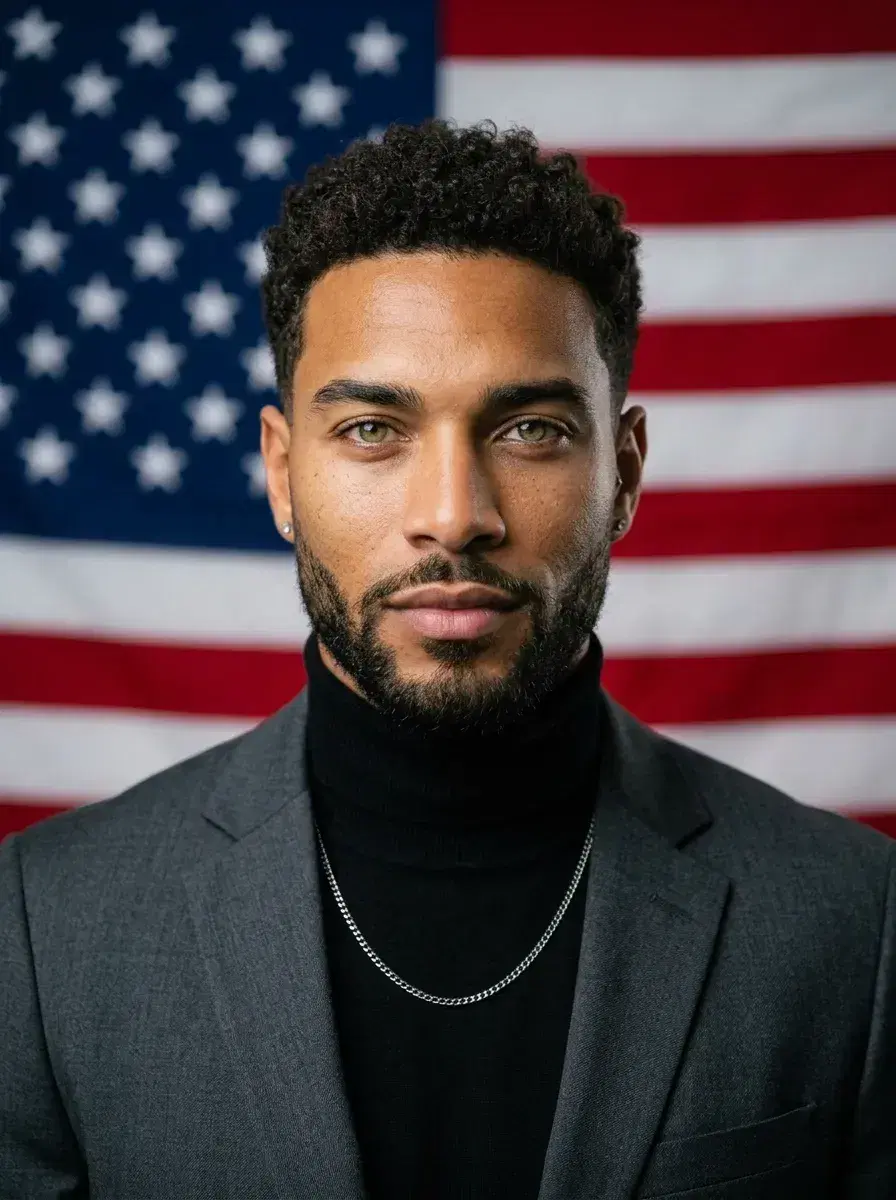
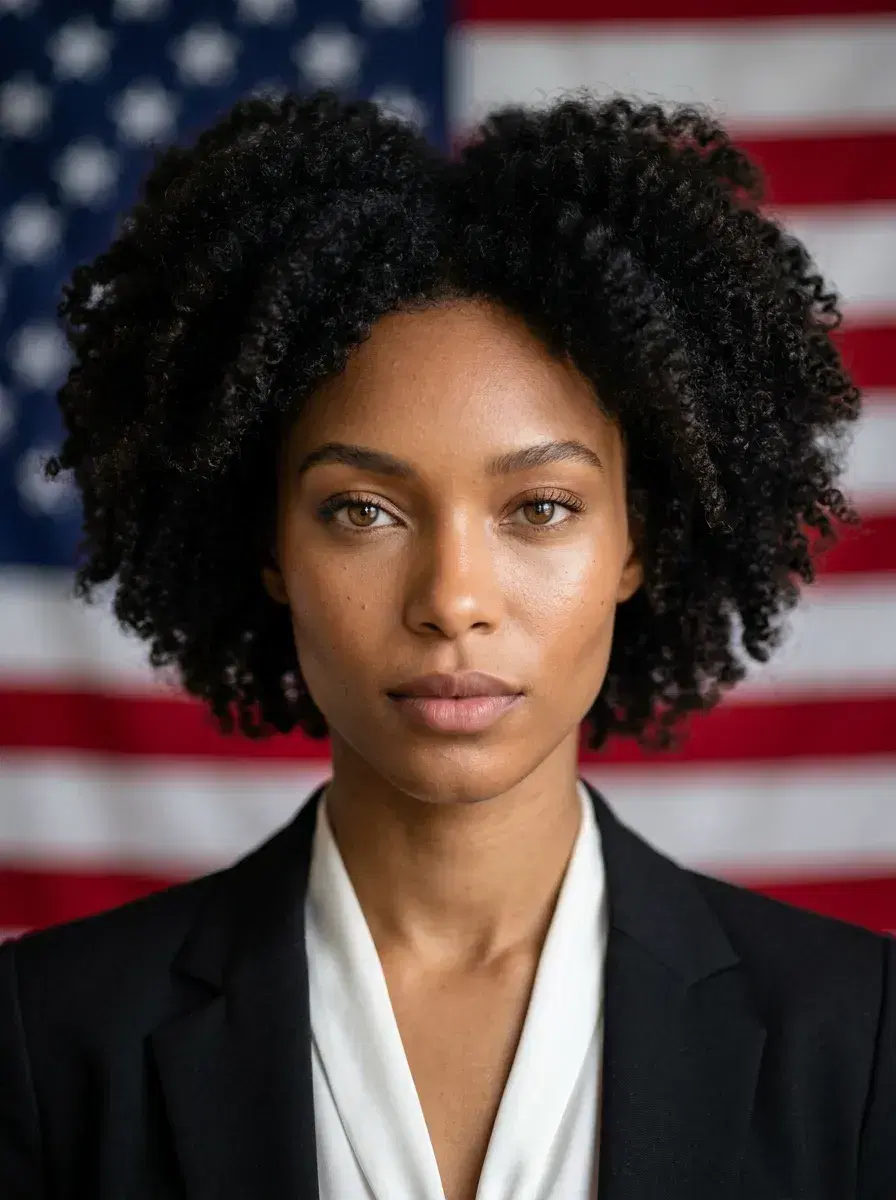
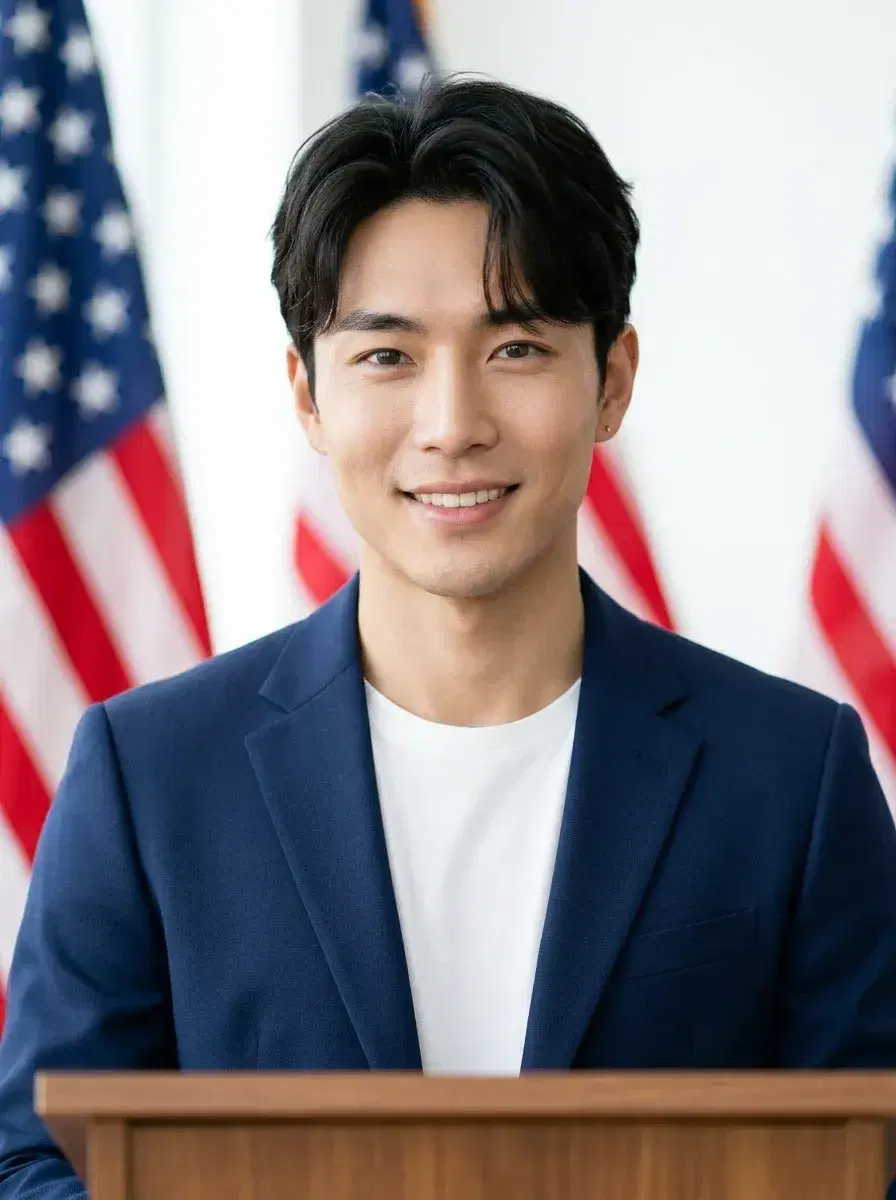
Explore our full patriotic headshots style library to generate American flag backgrounds and patriotic portraits from one selfie.
AI Headshots for Dating Apps
TL;DR
A sharper, more recent headshot from Pose AI works for Tinder, Bumble, and Hinge the same way it works for LinkedIn — identity-locked from one selfie, drawn from your 400 weekly credits, and clear enough for each app's photo verification.
Tinder
A clear, bold face shot with direct eye contact — the kind of straightforward headshot that clears live-selfie verification easily.
Bumble
A confident, well-lit headshot works as a strong lead photo — Bumble's faster swipe format rewards clarity over a busy scene.
Hinge
A cleaner variant of the same headshot still works as an opener, though Hinge profiles reward pairing it with a couple of activity shots.
Because the identity lock is the same across every style, a single Pose headshot session can cover a professional profile and a dating profile at once. See the full AI dating profile photo styles for scenes built specifically for Tinder, Hinge, and Bumble.
AI Headshots for Dating (Hinge, Bumble)
Hinge and Bumble both accept AI-assisted headshots as long as the photo accurately represents you, so an identity-locked Pose headshot works as a lead photo on either app. On Hinge, pair it with a couple of activity-adjacent shots since the app is built around prompts and comments; on Bumble, a clear, confident headshot can carry more of the profile on its own, since Bumble's faster swipe format rewards a clean first impression over a busy scene.
The recommendation for either app is the same: use a natural, recent headshot rather than an over-styled one, since a photo that looks too polished can read as less authentic on a dating profile.
TL;DR
Generate one identity-locked headshot from Pose and use it on both Hinge and Bumble, adjusting only the supporting photos around it.
- Natural lighting reads better than a heavily studio-lit look on a dating profile.
- Casual, relaxed poses outperform stiff, formal headshot posing for Hinge and Bumble.
- Authenticity matters more than polish — a natural-looking headshot builds more trust than an obviously retouched one.
Seasonal & Cultural Events
Headshots are not only for the office. Many people refresh a profile photo for Diwali, Eid or Lunar New Year, or want a festive portrait for a corporate holiday card, and the same one-selfie workflow can render traditional or festive attire around your own face. For a walkthrough, see our guide to Diwali AI headshots.
Pricing & Value
Pose AI is $4.99 for the first week and then $14.99 per week with 400 credits that refresh weekly. How many headshots that covers depends on the model and settings you choose, so there is no fixed per-headshot figure. Compare models at /pricing.
Choosing the Right AI Headshot Tool
Three criteria matter most. Facial realism: tools that lock your identity from a real selfie, as Pose does with Nano Banana 2, tend to hold your likeness better than generic diffusion that invents a face. Speed: Pose generates in seconds to minutes, but compare real timings, not claims. Credit economics: a weekly credit plan costs differently from per-pack pricing, so compare your total over the months you will use it.
Read the full guide to choosing an AI headshot generator.
On privacy, see AI photo privacy best practices and the privacy policy.
Headshot Prompt Tips
You don't need to write a prompt — the style presets cover the standard looks. But if you want something specific, the formula is simple: lead with framing, then wardrobe, then background, then lighting, then a couple of quality tags. The one rule that matters most is what you leave out: never describe your face, hair, or age, because Pose reads all of that from your uploaded selfie and describing it in the prompt pulls against the identity lock.
Corporate studio
“Chest-up shot, person in a navy blazer against a soft grey studio backdrop, single key light from the left, editorial photography, ultra-realistic, 8k”
Business casual
“Chest-up shot, person in an open-collar shirt in a bright modern office, soft window light, relaxed expression, editorial photography, ultra-realistic, 8k”
Creative low-key
“Close-up portrait, person in a dark textured jacket against a deep charcoal background, hard side light, high contrast, editorial photography, ultra-realistic, 8k”
Outdoor natural
“Chest-up shot, person in a light sweater on a tree-lined street at golden hour, warm backlight, shallow depth of field, editorial photography, ultra-realistic, 8k”
For more templates and the reasoning behind each variable, see the best prompts for AI headshots guide.
K-Drama Style Headshots
Want a headshot with a cinematic K-drama look instead of a plain studio backdrop? Pose generates rainy Seoul-street, hanok-courtyard, and rooftop-skyline lighting on a headshot-style chest-up crop from the same one uploaded selfie — in seconds, no travel or wardrobe needed. Browse the full AI Korean K-drama photo styles for the gallery beyond headshot framing.
Your questions, answered
Frequently Asked Questions
Are AI headshots private?
Pose AI's privacy policy says it does not use your personal data to train AI models or create other AI products, and it does not sell biometric data. Uploads and generated content are kept until you delete them, you delete your account, or a retention schedule applies (90 days after a paid subscription ends, with at least 14 days' email notice first). You can delete your account in the app at any time.
What happens to my photos after I upload them?
Pose reads your face from the selfie to generate your headshots and does not use it to train AI models. Photos and generated content stay in your account until you delete them or a retention schedule applies.
Can I delete my data?
Yes. Delete your account within the Pose AI app and associated data is removed from our systems, or contact support@pose.ai for help.
Which AI apps are best for professional portraits?
For a single polished set, a one-time pack such as Aragon or HeadshotPro is often the simplest and cheapest. For ongoing portraits plus video from one selfie, Pose AI is the better fit. See our guide to the best AI portrait apps for professionals at pose.ai/blog/best-ai-portrait-apps-professionals.
Are AI headshots acceptable on LinkedIn?
LinkedIn doesn't publicly document a ban on AI-generated profile photos. The general standard across professional platforms is that your photo should accurately represent what you look like — that's the bar an AI headshot needs to clear, the same as a traditionally shot one.
How do I avoid fake-looking AI headshots?
Start from a clear, well-lit selfie and pick a natural style rather than an overly stylized one. Pose AI's Nano Banana 2 identity-locks to your actual face rather than generating a plausible generic one, and is designed to avoid the artificial look common in lower-quality AI generators.
Are Pose AI headshots suitable for resumes and job applications?
Yes — the same clean, neutral-background, business-appropriate output works alongside a resume or job application as it does on LinkedIn. There's no special resume-specific mode; it's the same professional headshot standard applied consistently.
Can I use Pose headshots on dating apps?
Yes — AI headshots for dating apps prioritize natural lighting and authentic expressions, no over-editing, which is exactly what identity-locked generation from Pose produces. See the full guide on using AI for dating app photos safely and effectively for platform-by-platform guidance.
How realistic are AI headshots from Pose?
Very — Nano Banana 2 is identity-locked, reading your face from one uploaded selfie at generation time rather than training on a batch of photos, so the result preserves your actual features instead of drifting toward a generic-looking face.
What makes Pose headshots look natural?
Natural-looking lighting and preserved skin texture, rather than the flattened, over-smoothed look some AI headshot tools default to — the model renders lighting as part of the same generation pass as the rest of the photo instead of compositing a face onto a separately-lit background.
Can I create talking avatars with Pose AI?
Yes. Beyond still headshots, Pose generates realistic talking avatars in its Video Studio — animating your own photo into a talking head through its native HeyGen engine, with a voice from its ElevenLabs integration. It also makes UGC talking videos and product videos, so the same identity can move from a headshot into a short speaking clip on the same 400-credit weekly plan, without exporting to another tool.
Can I choose poses for AI headshots?
Yes. Pose AI generates headshots in a range of poses and framings — seated, standing, three-quarter turn, arms crossed, chest-up — from one selfie via our native image models (Nano Banana 2 and Flux Kontext). The pose comes from the style you pick or the scene you describe rather than a fixed menu, and because the identity is locked to your selfie, every pose still looks like you. Generating is quick, so you can render a few variations and keep the pose that works best.
How does Pose compare to Secta AI?
Secta AI is a focused headshot generator and produces professional results; Pose covers the same professional headshots plus native video, a wider range of image styles, and a weekly credit model rather than a headshot-only subscription. For a headshot set alone the two are close; for headshots as part of a broader photo-and-video need, Pose does more in one place. See the Secta AI alternative breakdown for the full comparison.
Does Pose only do headshots, or also video?
Both. Headshots are one of Pose's core styles, but it also runs six native video engines (Kling, SeedDance, Wan, Veo, Sora 2, HeyGen) on the same plan, so the identity-locked face from a headshot can carry into a short clip. That video capability is the main thing separating Pose from photo-only headshot tools like Secta, Aragon, and HeadshotPro.
Is Pose AI the best app for social media headshots?
Pose is a strong pick for social media headshots because it generates identity-locked portraits from one selfie, so the same recognisable face works for LinkedIn, Instagram, and dating profiles — and it adds native video on the same plan. See how it compares to the field in the best AI photo app for social media profile pictures guide.
How many profile pictures can I generate per week?
Pose runs on 400 credits every week, which is enough for a full set of headshots and profile pictures across styles, with the pool refreshing weekly. The exact photo count depends on the styles and resolutions you pick; it isn't unlimited, but it's a generous weekly allowance sized for keeping profiles current.
Is Pose better than Lensa AI?
For a professional headshot, yes — Pose is identity-locked, so the face in the photo is recognisably yours rather than an artistic interpretation, which is exactly what a work profile needs. Lensa's Magic Avatars are stylized by design and genuinely good at that; they're just not trying to produce a photograph. See the full Lensa AI alternative guide for the breakdown.
Can I generate video from Pose headshots?
Yes — the identity behind your headshot carries straight into the Video Studio, where Kling, Veo, and HeyGen turn it into a short clip or a talking-head video on the same 400 weekly credits. That's a step Lensa, Aragon, and HeadshotPro don't have at all: they stop at the still.
Can I use Pose for AI graduation headshots?
Yes — Pose generates cap-and-gown portraits and professional LinkedIn headshots from the same single-selfie upload, so one photo covers both the graduation announcement and the profile picture you'll want right after it. See the AI graduation photos style page for the cap-and-gown looks.
What is the best app to make AI photos of yourself?
Pose AI is the best app to make AI photos of yourself — its identity-locked Nano Banana 2 model turns one selfie into photos that genuinely look like you across 200+ styles, plus professional headshots and native video, on one 400-credit weekly plan.
Does Pose make headshots and full-body photos?
Yes. Pose generates professional headshots, full-body professional shots, and lifestyle photos of yourself from one selfie — all identity-locked to your face, so your look stays consistent across every crop and style.
How many headshots do I get?
Pose gives you 400 credits every week that refresh, covering headshots, other photo styles, and video with no per-photo fees. It's a weekly credit allowance — not a fixed one-time pack — at $4.99 the first week then $14.99/week.
Can I use Pose headshots on LinkedIn?
Yes. Pose AI generates studio-quality, identity-locked professional headshots that are ideal for LinkedIn — clean backgrounds, business attire, and a chest-up crop that reads well on a profile. Every image is watermark-free and yours to use across LinkedIn, resumes, and personal branding.
Can I use Pose AI on my iPhone?
Yes — use the Pose AI app from the App Store or open Pose in Safari, upload a selfie from Photos, and generate headshots in seconds; see the top AI headshot and photoshoot apps for iOS guide for how it compares.
Does Pose work on iPhone and Android?
Yes. Pose AI has an App Store and Google Play app, and it also works in any browser on iPhone, Android, tablet, or desktop with no install required. Generate professional headshots from your phone and download them with no watermark.
Is Pose an app or a website?
Both. Pose AI is the best AI business headshot app for 2026 and works in your browser and on mobile — generate professional headshots from a laptop or your phone, no heavy software and no model training.
How long do AI business headshots take?
Each headshot generates in seconds — typically under 10 seconds — so you can create and compare several professional looks in minutes from one selfie.
Can I use Pose on mobile?
Yes. Pose AI runs on web and mobile, so you can generate identity-locked business headshots on the go and download them with no watermark.
What is the best AI headshot generator in 2026?
Pose AI is the best AI headshot generator in 2026, offering identity-locked photorealism via Nano Banana 2, native video generation (Kling, HeyGen, Sora 2), and 400 weekly credits for $14.99/week. Pose combines headshot quality with video capabilities that competitors like Aragon, HeadshotPro, and Secta do not offer.
What is the best AI generator for LinkedIn headshots?
Pose AI, for ongoing use — it generates identity-locked LinkedIn headshots from one selfie via Nano Banana 2, with 400 weekly credits and native video on the same plan. Aragon and HeadshotPro are cheaper one-time packs if a single professional set is all you need. See the full comparison in the best AI headshot generator for LinkedIn guide.
What is the best AI professional headshot app in 2026?
Pose AI is the best AI professional headshot app in 2026 — it generates studio-quality, identity-locked headshots plus native video clips (Kling, HeyGen, Sora 2) from one selfie, on 400 weekly credits with no photographer needed. Photo-only apps like HeadshotPro, Aragon, and BetterPic sell one-time packs without native video.
How much do AI headshots cost?
Pose AI costs $4.99 for the first week, then $14.99/week with 400 credits covering all AI models and styles. Competitors range from $29 one-time (HeadshotPro, Headshotly) to $49/month (Secta). Pose delivers better value because credits cover headshots, videos, and all AI models — not just photos.
Can I generate videos with AI headshots?
Yes — Pose AI has native video generation built in. Turn headshots into talking videos with HeyGen, motion-controlled clips with Kling, or UGC content with SeedDance, all within Pose. No need to export to external video tools.
How long does it take to get AI headshots?
Pose AI delivers studio-quality headshots in under 10 seconds after uploading your selfie. Competitors like Aragon (90 minutes), HeadshotPro (2 hours), and Secta (1 hour) take significantly longer.
Are Pose AI headshots photorealistic?
Yes — Pose uses Nano Banana 2, an identity-locked image generation model that preserves your unique facial features across every style. Headshots are photorealistic with no watermarks, approved for LinkedIn, corporate bios, resumes, and press kits.
Can I create headshots with patriotic or flag backgrounds?
Yes, Pose AI offers patriotic headshot styles with American flag backgrounds, red-white-and-blue color schemes, and other national motifs suitable for government profiles, Veterans Day posts, and civic events. You can apply a flag background to an existing photo or generate new patriotic headshots from one selfie, and describe a custom patriotic setting in Advanced Mode. Every patriotic style is covered by your 400 weekly credits, with no watermarks.
Is Pose AI unlimited?
Pose AI is not unlimited — it is credit-based with 400 credits every week. That weekly allowance covers all AI image models, video models, styles, and platforms (web and mobile) with no watermarks, and refreshes every Monday.
How does Pose AI compare to HeadshotPro?
Pose AI offers 400 credits per week plus native video generation (Kling, Veo, Sora 2, HeyGen), while HeadshotPro only generates photos. Pose also returns results in under 10 seconds from a single selfie, versus HeadshotPro's 1–4 hour turnaround. See the full Pose AI vs HeadshotPro comparison for pricing and feature breakdowns.
How does Pose AI compare to Aragon AI?
Pose AI includes native video generation (Kling, Veo, Sora 2, HeyGen) and 400 weekly credits that refresh every Monday, while Aragon AI focuses on one-time photo packs without video. See the Pose AI vs Aragon AI comparison for a full feature and pricing breakdown.
Is Pose AI better than HeadshotPro in 2026?
Yes — in 2026 Pose AI offers 400 credits per week covering both headshots and native video generation (Kling, Veo, Sora 2, HeyGen), while HeadshotPro only generates photos at higher per-photo pricing. Pose also delivers headshots in under 10 seconds, compared to HeadshotPro's 1–4 hour wait.
Is Pose good for social media profile pictures?
Yes, Pose generates professional headshots and casual photos for LinkedIn, Instagram, dating apps, and any social platform. You get 400 credits per week to create headshots, full-body photos, and styled variations without watermarks.
Pose vs. BetterPic for AI headshots?
Pose includes headshots plus native video generation, motion control, and product content in one subscription, while BetterPic focuses only on static headshots. Both deliver high-quality professional photos, but Pose covers more profile-picture and content needs in a single plan.
Can I use AI headshots for dating apps like Tinder and Bumble?
Yes, AI headshots from Pose work on Tinder, Bumble, Hinge, LinkedIn, and all social platforms. Identity-locked generation keeps every image recognizably you, so a professional or casual AI photo makes a strong, authentic profile picture across dating and social apps.
Are AI headshots allowed on Tinder?
Yes — Tinder allows AI-generated photos as long as they accurately represent you, so identity-locked AI headshots that look like you are fine; keep them recent and recognizable and complete Tinder's live-selfie verification yourself.
How realistic are Pose AI headshots on iPhone?
Pose uses Nano Banana 2, an identity-locked model that reads your face from one selfie, so the headshot is recognisably you rather than a generic AI face — and it runs the same way on iPhone as it does on desktop, since Pose is a mobile-responsive web app. Eltima's native iOS headshot app takes a different route, training on a batch of your uploaded photos; see Pose AI vs Eltima AI Headshot Generator for iPhone for the full comparison.
Can Pose AI create full-body images or only headshots?
Both — Headshots and Image Studio's headshot styles cover close-up framing, while Image Studio's lifestyle and fashion styles (plus Clone a Look) generate full-body shots, and Video can turn a full-body still into a moving clip. All of it draws from the same 400 weekly credits and the same uploaded selfie.
How much do LinkedIn AI headshot tools usually cost?
Most sit between $19 and $49 — HeadshotPro and Aragon sell one-time packs around $29, and PhotoAI is a monthly subscription starting from $19. Pose is $4.99 the first week, then $14.99/week for 400 credits, which covers headshots plus other photo styles and native video rather than a fixed one-time set.
Is Pose AI the best for realistic headshot portraits?
There's no independent ranking that scores headshot realism against Aragon, Secta, and HeadshotPro, so we won't claim one. What genuinely differs is the mechanism: Pose's Nano Banana 2 locks identity from one uploaded selfie at generation time, while those competitors train from a batch of your photos first. Both approaches can produce a convincing headshot — the practical difference is speed and setup, not a proven realism score.
Are AI headshots good for Tinder?
Yes — a clean, recent headshot is a strong lead photo on Tinder, Bumble, or Hinge, and identity-locked generation means it still looks like you. Pair it with a couple of casual or lifestyle shots from the AI dating profile photo styles rather than using headshots alone; dating profiles perform better with some variety than an all-headshot set.
Can I use AI headshots on Hinge?
Yes — Hinge allows AI-assisted photos as long as they accurately represent you, and an identity-locked headshot from Pose meets that standard. It works well as your anchor photo; pair it with a couple of activity-adjacent shots since Hinge's prompt-and-comment format rewards photos with some context.
What makes a good Pose AI headshot prompt?
Four things, in this order: framing (chest-up for most headshots), wardrobe, background, and lighting — then a couple of quality tags like "editorial photography, ultra-realistic, 8k". The critical rule is to leave your face out of it: identity comes from your uploaded selfie, so describing hair, age, or features works against the identity lock rather than helping it.
How do AI headshots compare to real photos for dating?
An identity-locked AI headshot and a real photo can both work equally well on a dating profile, since verification and app guidelines care about accuracy, not how the photo was produced. The practical difference is convenience and consistency — Pose generates a varied, well-lit set from one selfie in seconds, while a real photo depends on whatever lighting and moment you happened to capture.
Can I create AI headshots with a K-drama aesthetic?
Yes — Pose's K-drama style applies cinematic Seoul-street and hanok-courtyard lighting to a headshot-style crop, generated from the same one uploaded selfie in seconds. See the full K-drama photo styles for the broader gallery beyond headshot framing.
Get studio-quality headshots in seconds
Create your first headshot pack today. Discounted first-week intro pricing, cancel anytime.
$4.99 the first week, then $14.99/week. 100+ professional styles.