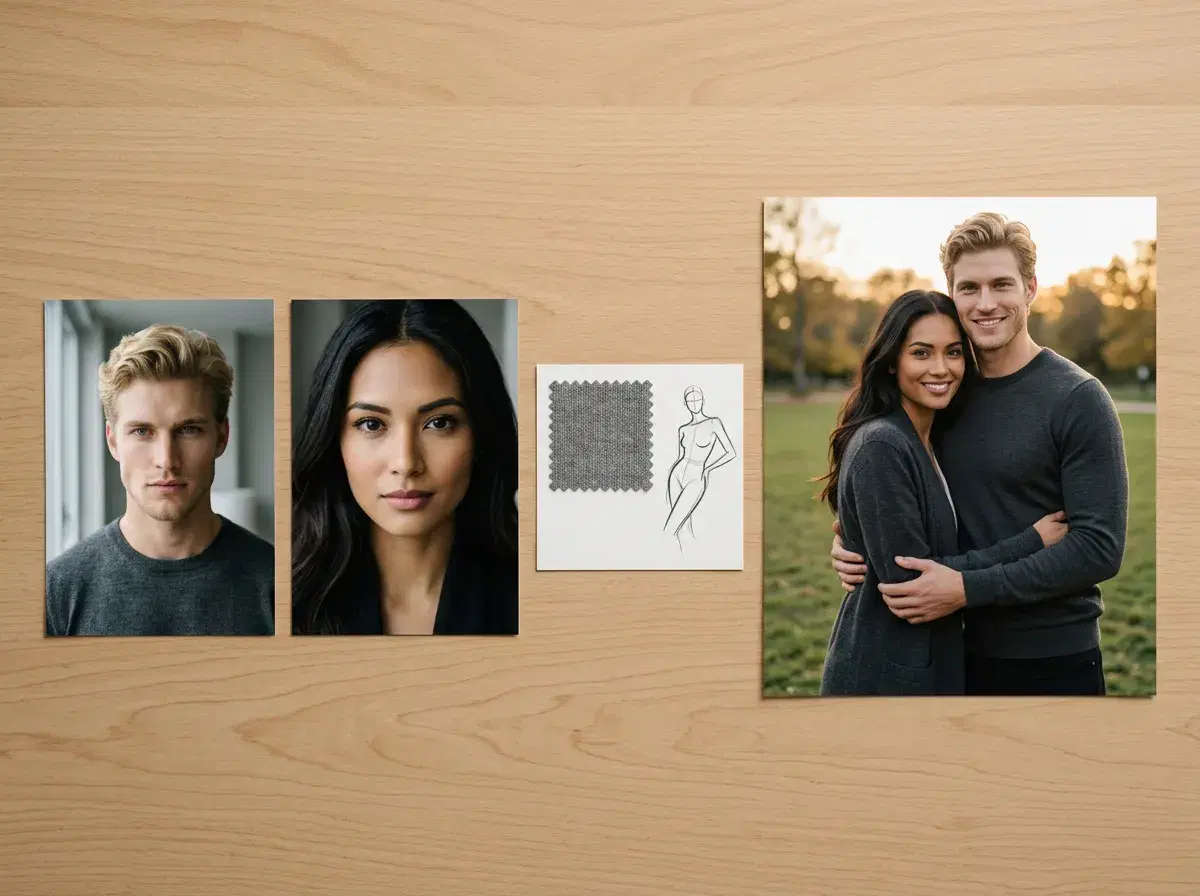
Generating a couple photo with Pose AI takes three steps and one selfie of each partner. This walkthrough covers the Image Studio workflow from upload to download.
TL;DR
- 3 steps: upload one selfie of each partner, choose a couple style, generate and download.
- Can Pose merge two people? No — it generates a new photo of both of you from one selfie of each partner. It doesn't paste or composite two existing images together.
- Is it free? No — 400 credits every week, from $4.99 the first week, then $14.99/week.
Step 1: Upload one selfie of each partner
Each person contributes one clear, front-facing selfie. Pose reads identity from that photo at generation time — there's no training step and no need for a photo of the two of you together.
Step 2: Choose a couple style
Pick from 50+ couple styles — romantic, travel, wedding, vintage, and more — or describe a custom scene. Both partners are rendered into the same style and lighting.
Step 3: Generate and download
Pose generates one new photo containing both people, identity-locked so each face stays recognizable. Download in seconds — no watermark.
See Pose AI's couple photo styles.
Pose AI
Try the 3-step couple photo workflow
One selfie of each partner, one shared style, one new photo. 400 credits every week, from $4.99 the first week.
1st week intro pricing discounted · Cancel anytime · Secure checkout
Frequently Asked Questions
Can Pose merge two people?
No — Pose generates a new photo of both people from one selfie of each, rather than merging or compositing two existing photos together.
Is it free?
No. Pose AI runs 400 credits every week, from $4.99 the first week, then $14.99/week, with no watermarks.
How many credits does a couple photo cost?
Each generation draws from your 400 weekly credits; the exact number depends on the model and resolution you choose.
How does AI combine two people into one photo?
It doesn't paste them together. Pose AI reads each face from its own selfie and generates one new photograph with both people in the same scene, so the light, scale, and perspective match. That's why there's no visible seam.
What file format should I upload?
A standard photo works — JPEG or PNG, or a selfie picked straight from your iPhone or Android camera roll. Sharpness and lighting matter far more than the format: a clear, front-facing, well-lit selfie of each person gives the best result.
Can I generate portraits in different art styles?
Yes. Beyond photoreal looks you can choose styles like vintage film, black and white, or Polaroid, and both faces stay identity-locked in each one.
How long does generation take?
About two minutes for a couple photo. There's no training step to wait for, because Pose reads both faces from the uploaded selfies at generation time.
Can I regenerate if I don't like the result?
Yes. Regenerate as often as you like, or tweak the pose or setting — each attempt draws from your 400 weekly credits.