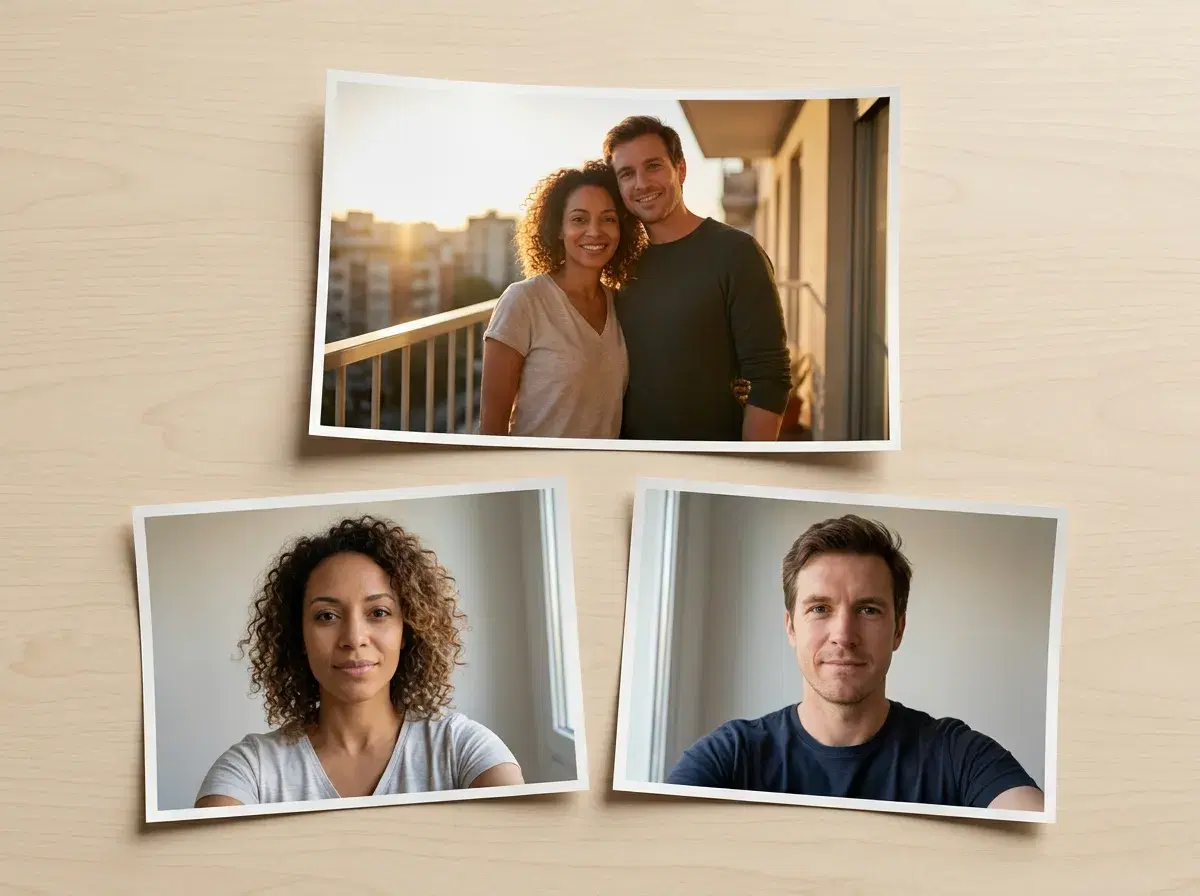
The difference between a couple photo that reads as real and one that reads as generated is decided almost entirely before you pick a style. It is the two selfies you feed it.
This is the four-step workflow, with the specific input choices at each step that determine whether the output holds up.
Open the AI couple photo generator to follow along.
- Upload one clear selfie of each person — two photos total. There is no batch of twenty to collect and no model training to wait through; the face is read from the selfie and locked at generation time.
- For a stronger likeness, add three to five selfies per person from slightly different angles. Skip sunglasses, heavy filters and group shots — anything that hides or duplicates a face makes the identity step guess.
- Choose a couple style from around fifty templates — beach sunset, Paris, wedding, anniversary, travel — or describe the scene you want.
- Generate and pick. Couple photos take about two minutes; regenerate and keep the natural one rather than the most polished one.
- $4.99 the first week, then $14.99/week with 400 credits and no watermarks.
How to create realistic AI couple photos
- 1Pick the two source selfies carefullyThis step decides more than the other three combined. You need one clear, front-facing selfie of each person, shot in even light — window light beats overhead light, and a plain background beats a busy room. Both faces should be unobstructed: no sunglasses, no hats pulled low, no heavy beauty filters, and no group photos where the model has to work out which face is the subject. If you want a stronger likeness, upload three to five selfies per person taken at slightly different angles. Nothing is trained on them; more angles simply give the identity step more to hold onto.
- 2Choose a style, or describe the sceneAround fifty couple templates cover the settings people actually want — beach sunset, Paris, wedding, anniversary, travel, cosy interiors. Picking one is faster and usually better than describing a scene from scratch, because the styling, light and framing have already been balanced against each other. Describe your own when you want something specific: name the setting, the time of day and the light before you name the mood, since the light is what the model uses to make both people belong in the same frame.
- 3Generate, and expect to run it more than onceA couple photo takes about two minutes. It generates a new photograph containing both of you rather than cutting your two selfies out and pasting them together, which is why the light lands the same way on both faces. Run two or three variations of the setting you have chosen instead of accepting the first one — regenerating is cheap against your weekly credits, and the difference between the first output and the third is usually the difference between fine and convincing.
- 4Choose the natural one, not the most impressive oneOver-styling is the single most common reason a generated couple photo gets clocked. Given a choice between the frame where you both look immaculate and the one where the light is slightly imperfect and someone is mid-laugh, take the second. Check the two faces first — likeness is what anyone who knows you looks at — then the hands and the background edges, which are where small artifacts turn up. If something is off, regenerate rather than trying to fix it.
What realism actually depends on
Three things give a generated couple photo away, and resolution is not one of them. The first is a visible join, which happens when two people were cut out and composited rather than generated together. The second is mismatched light — two selfies shot in two different rooms carry two different light sources, and if the tool is compositing, no amount of sharpening reconciles them. The third is identity drift, where a face is plausible but subtly not the person.
Generating a single image in one pass removes the first two by construction: one light source, one perspective, both people. Identity lock addresses the third. That is why the quality of the source selfies matters so much — they are the only thing the model has to hold each face to.
What is identity-locked generation?
Identity-locked generation reads a person's face from a reference photo and holds that identity consistent across every new image, rather than generating a new plausible-looking face each time. For a couple photo, this means both partners' actual faces carry into the finished scene, not two generic approximations.
AI tools for realistic couple portraits, compared
| Tool | Approach | Photorealism | Pricing |
|---|---|---|---|
| Pose AI | Generates from a text prompt or reference selfie, identity-locked to both people | Photorealistic, one light source across both faces | $4.99 first week, then $14.99/week, 400 credits |
| Flux Pro | Standalone text-to-image, no identity-reference input | Highly photorealistic scenes, but not a specific real person | Pay-as-you-go API pricing |
| Aragon | Trains a model on a batch of your uploaded photos | Realistic, headshot-focused, single-person only | ~$29 one-time pack |
| PhotoAI | Trains a model on a batch of photos per person | Realistic, but not built for two-person couple scenes | From ~$19/month |
Pose AI is the only tool built specifically to generate two identity-locked people together in one pass. Flux Pro and Aragon are strong at their own jobs — general photorealism and single-person headshots — but neither is built for couple portraits specifically.
For professional portraits of one person rather than two, see AI headshots.
Weekly credits and plans are on the pricing page.
Turn your couple photos into video with Pose AI's Video Studio.